If your bots have been running for a few years, you probably know the feeling. Everything works until someone changes a form, and then the day starts with a queue of cases nobody can explain.
That usually gets filed as an RPA problem, and the first instinct is to shop for something new. There is a smaller move: work out which part of the job needs reading and judging and add a layer for just that.
So here is the plain version. We will look at how intelligent automation differs from RPA, whether RPA counts as AI, where AI agents fit, and how to tell when your bots have hit a ceiling.
TL;DR
- RPA is not AI. It follows fixed rules on structured data, and AI is a separate layer you add for reading and deciding.
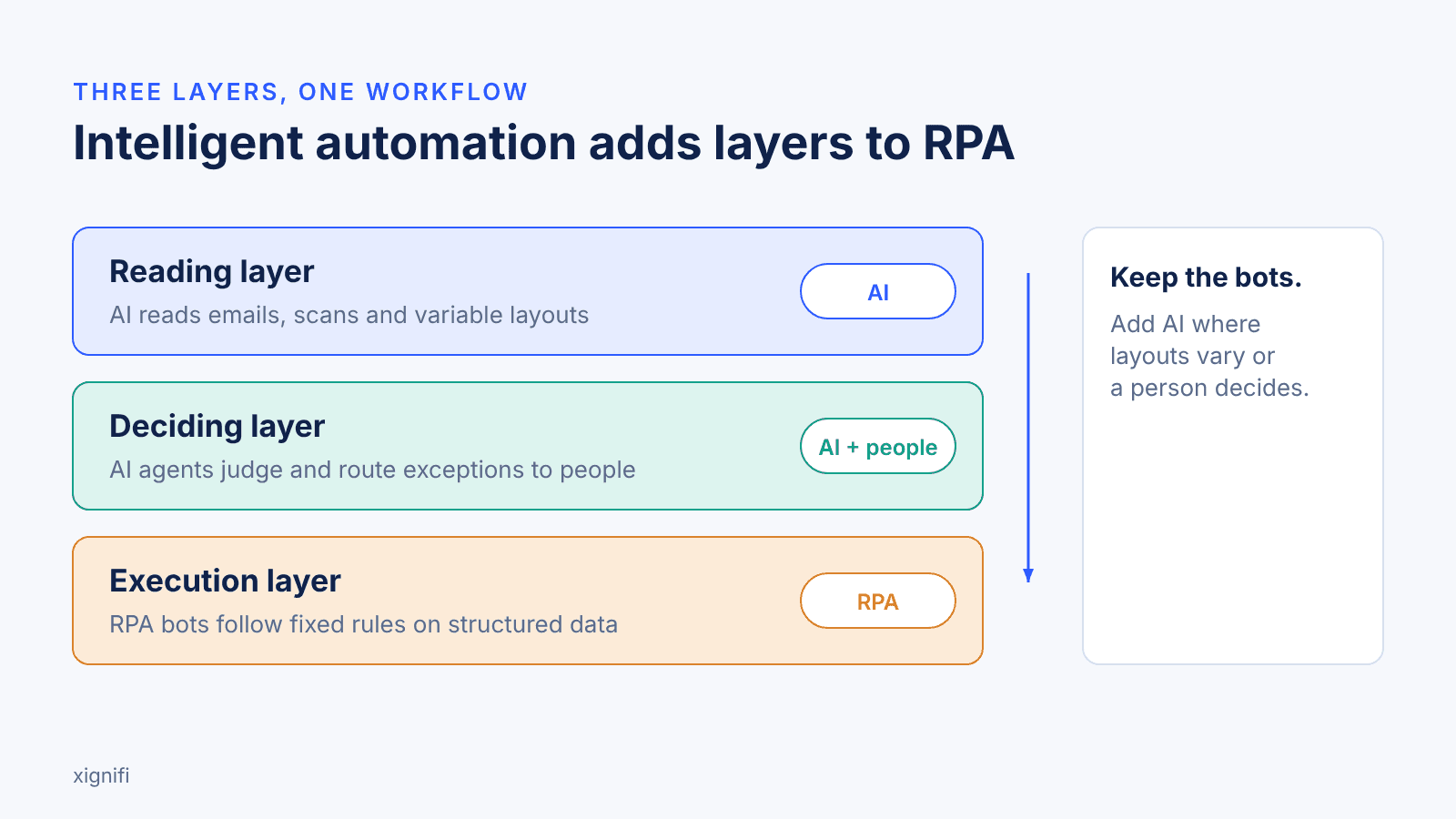
- A working bot does not need replacing. Intelligent automation keeps RPA as the execution layer.
- Add AI only where a layer fails your own test: layouts vary, a person has to decide, or routing depends on content or risk.
- Test on last month’s hardest real cases, not clean demo files.
- Gartner’s guidance is to use AI agents where decisions are needed, automation for routine workflows and assistants for simple retrieval.
- Set targets from your own baseline, such as turnaround time and exception rate, and check what is logged for each decision.
How Does Intelligent Automation Differ from RPA?
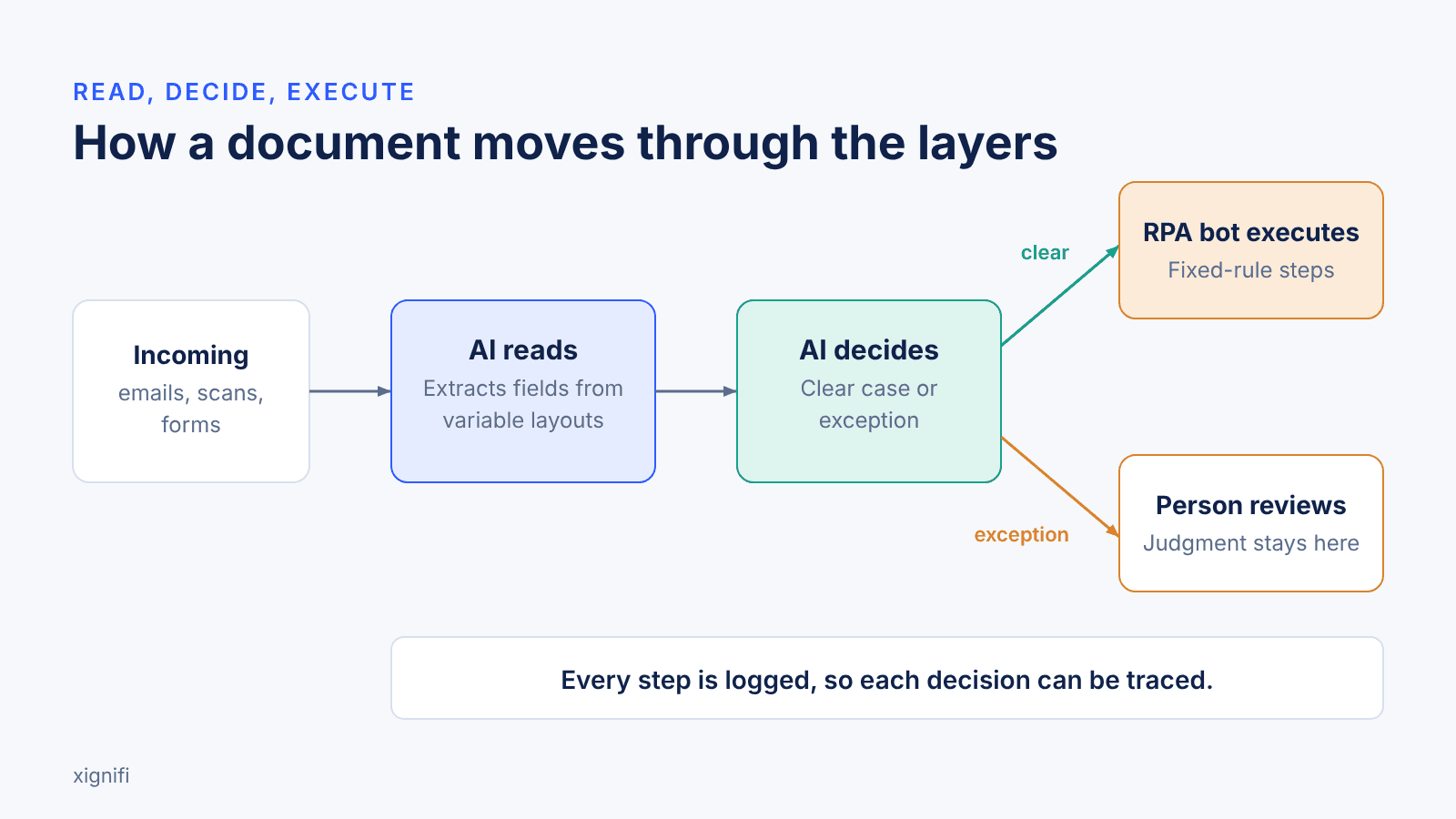
Robotic Process Automation (RPA) executes steps that a person could write as if-then rules, on data that arrives in a fixed structure. Intelligent automation adds an AI layer that reads variable inputs, makes a judgment and hands the result to the bot. The difference shows up in three places: the data each one handles, how exceptions are treated, and who decides.
IBM's 2017 white paper draws the line in the same place: RPA suits processes with structured digital information and logic-based rules, and AI is needed where information is hard to capture or the rules call for judgment and context (IBM Global Business Services, 2017). IBM community guidance from 2020 describes the practical job as turning the variation in incoming business documents into structured data that bots can process (IBM, 2020). A loan file or a premium finance agreement is the usual case, because the same fact sits in a different place on every document.
Is RPA Considered AI?
No. RPA follows scripted rules and does not interpret anything on its own. Vendors add AI to RPA through machine learning and natural language processing, which makes AI a separate layer (IBM community, 2022).
Do AI Agents Replace RPA Bots?
Not by default. The working question is which tasks each layer handles. Agents suit multi-step work that spans systems and needs judgment, and bots stay efficient at fixed, repeatable steps.
Gartner's guidance is to match the tool to the job: agents at decision points, automation for routine workflows, and assistants for simple lookups. The same release forecasts that over 40% of agentic AI projects will be canceled by the end of 2027, citing escalating costs, unclear business value or inadequate risk controls (Gartner, June 25, 2025). It also says many use cases sold as agentic do not need an agentic design, so scope the first agent narrowly, keep a person on exceptions, and log each decision.
For six workflow-specific examples in insurance, see Xignifi's guide to AI agents in insurance operations.
Which Layer Should You Keep and Which Should You Add?
Keep every layer that still does its job, and add a layer only where cases break the current one. Bots stay where steps are fixed, and OCR stays where templates are fixed. Add AI where layouts vary or a person has to decide.
Which Automation Layers Should You Keep, Upgrade or Add?
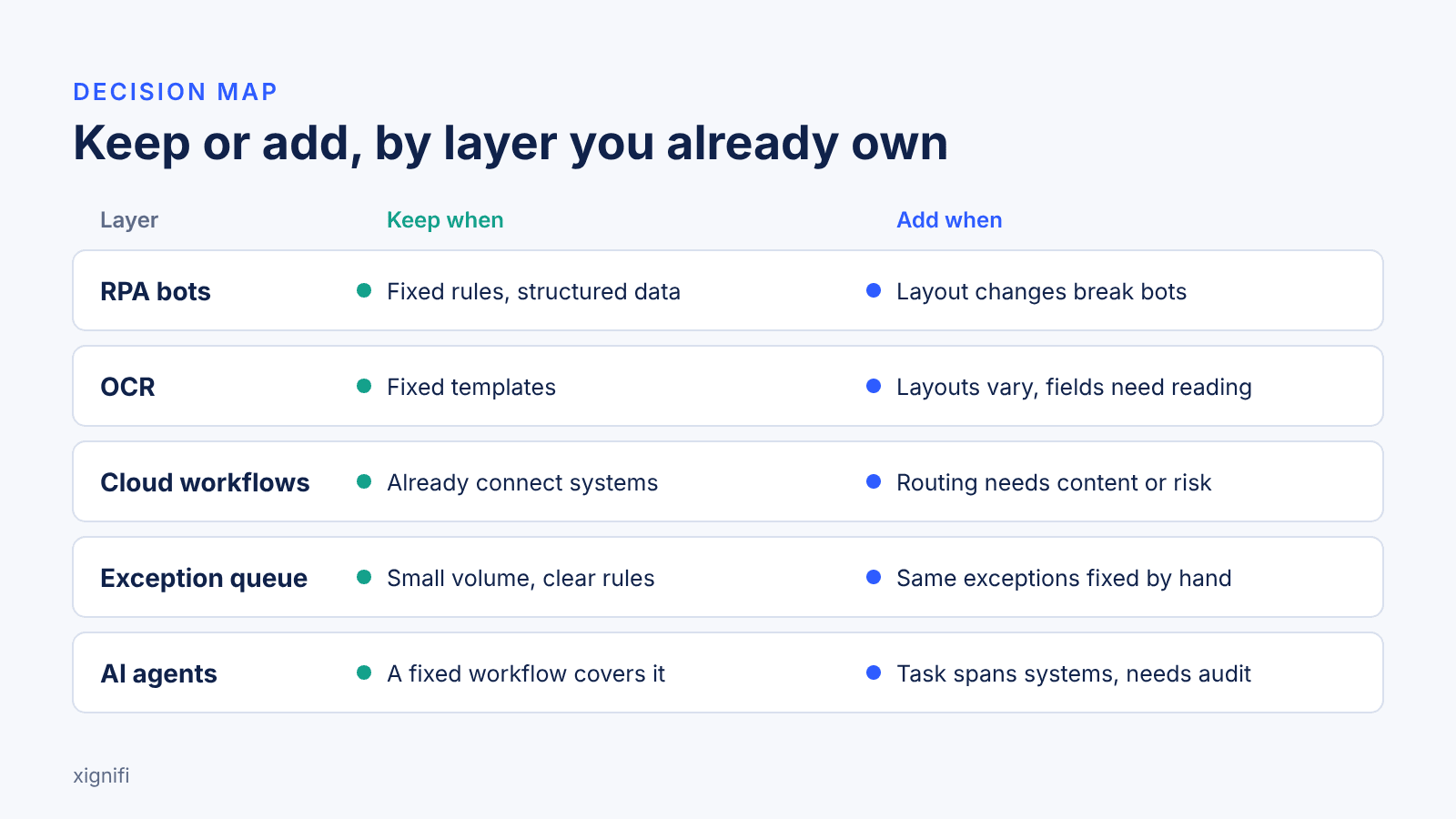
This table maps each layer you may already own to the signal that says keep or add, with a test you can run on your own cases.
| Layer you own | Keep when | Add when | Test with your own case |
|---|---|---|---|
| RPA bots | Steps follow fixed rules on structured data | Bots break after a layout change, or a person must decide | Move one field on a form and rerun the bot |
| OCR | Documents use fixed templates | Layouts vary and fields need interpretation | Feed it the hardest scan you handled last month |
| Cloud workflows | They already schedule and connect systems | Cases need routing by content or risk | Send a case with missing data and watch where it routes |
| Manual exception queue | Volume is small and rules are clear | People resolve the same exception types by hand | Count exception types per week against your baseline |
| AI agents | A fixed workflow covers the case | A task spans several systems and needs an audit trail | Ask what is logged and who can see it |
Add one layer where your own test fails and leave the rest in place. No row calls for replacing a bot that works.
What do Mortgage, Insurance and Banking Teams Automate First?
Start with the document-heavy steps that stall a file. In mortgage processing, that means loan files, income and asset documents, verification and conditions.
In insurance, it means submissions, endorsements and cancellations. In banking, it means onboarding, KYC documents and statements (banking industry page).
How do you Know RPA has Hit its Ceiling?
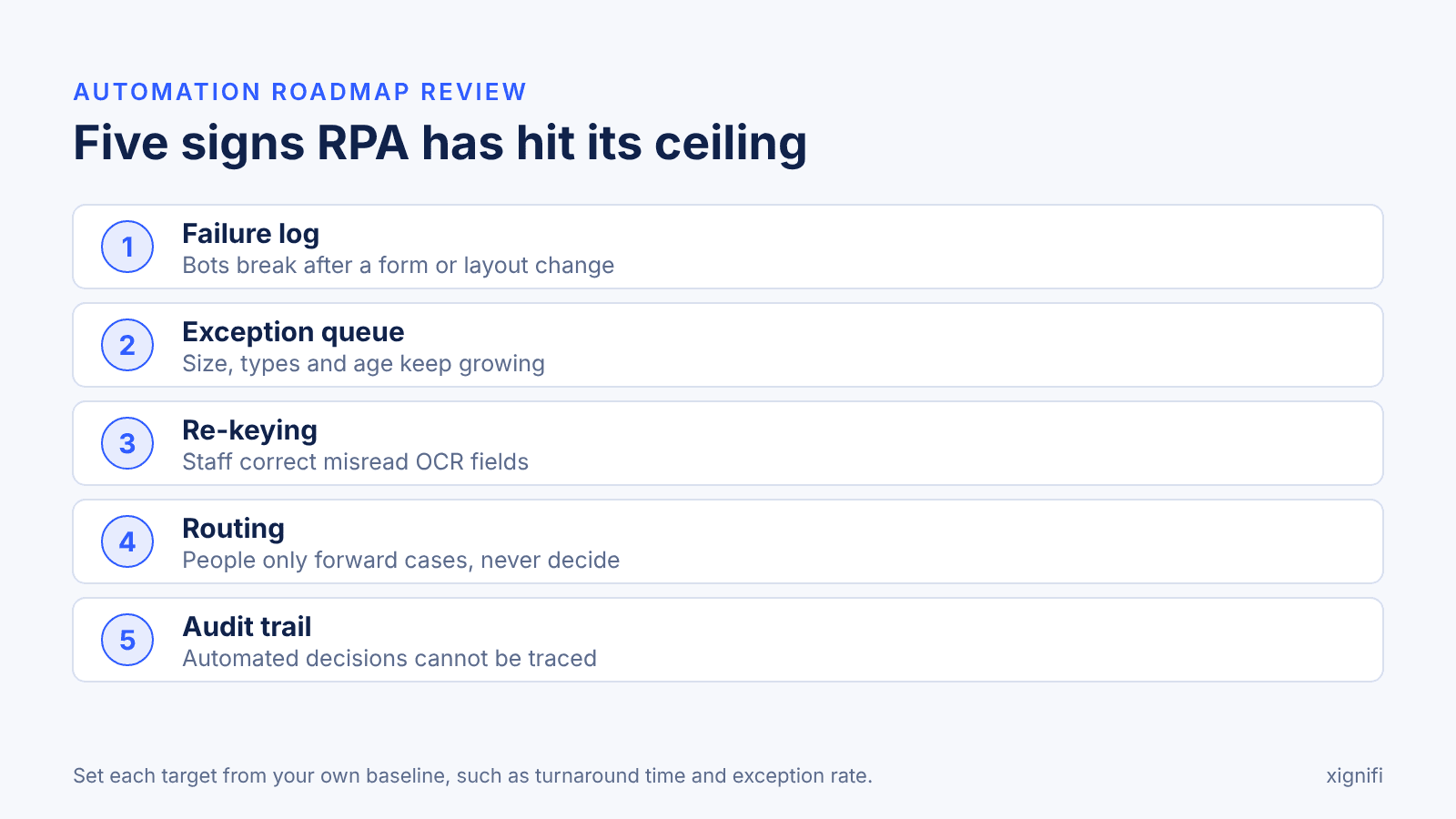
Look for failures you can observe, not a feeling that bots are slow. An automation roadmap review checks five things:
- 1.Failure log: which bots broke, and what changed upstream.
- 2.Exception queue: size, types and age against your baseline.
- 3.Re-keying: which OCR fields staff correct, and how often.
- 4.Routing: which cases a person only forwards and never decides.
- 5.Audit trail: whether each automated decision can be traced.
Set each target from your own baseline, such as current turnaround time and exception rate.
ROI calculator
What does your backlog cost?
A calculator for what a backlog costs. Set your own baseline before you decide which layer to add.
Open the ROI calculatorWhere Does Intelligent Automation Still Need People?
It needs people at exceptions and judgment calls, and it depends on clean access to the documents and systems it reads. If a document arrives incomplete, an AI layer can flag the gap but cannot supply the missing data.
Software alone does not make a firm compliant with any regulation. Automation takes the preparation off people's desks, and judgment stays with the person who owns the decision.
Where Does an Agentic Approach Fit?
An agentic approach is useful when automation needs to do more than extract data or follow fixed rules. It can help interpret varied documents, support decisions on exceptions and coordinate multi-step workflows across systems, with human oversight where judgment is needed.
Xignifi brings these capabilities together through three platform components: Document Intelligence for document processing, Cognitive Intelligence for complex decisions, and Operational Intelligence for workflow automation.
For example, Xignifi's guide to AI agents in insurance operations describes agents configured to escalate cases when human judgment is required. When evaluating any platform, including Xignifi, ask how it handles exceptions, integrates with existing systems and maintains an auditable record of decisions.
Trade-off test
Which version of your AI system would you launch?
Ten pairs of choices compare two versions of the same AI system. They differ in human oversight, monitoring, compliance, speed and cost. It takes about two minutes.
Start the testWhat else do teams ask about intelligent automation and RPA?
Is intelligent process automation different from intelligent automation?
This post treats intelligent process automation and cognitive automation as other names for intelligent automation, meaning RPA combined with AI that reads, decides and routes. Vendors may draw the lines differently, so ask each one to define the term by what the software does to a document. [ASSUMPTION]
Can RPA read scanned documents?
RPA bots can read scanned documents when paired with OCR, and that pairing works best on fixed templates. IBM community guidance from 2020 frames the work as converting varied incoming documents into structured data a bot can process. When layouts vary, an AI reading layer takes over that conversion.
Is agentic automation the same as intelligent automation?
In this post, agentic automation means AI agents that carry out multi-step work across systems, which makes it one part of intelligent automation. Intelligent automation also covers simpler pairings, such as OCR feeding a bot. Gartner's June 2025 release says vendors rebrand RPA and chatbots as agentic without real agentic capability, so ask to see the multi-step decision, not the label.
What should a pilot test first?
Test the hardest real cases you handled last month, not clean demo files. Measure exception rate, turnaround time and rework against your own baseline, and check what is logged for each decision.
Do I need to replace my existing RPA to add intelligent automation?
No. Intelligent automation treats RPA as the execution layer, so bots that follow fixed rules on structured data can stay in place while AI is added for reading and deciding. Replace a bot only when it fails your own test, such as breaking after a layout change. Gartner's June 2025 release notes that integrating agents into legacy systems can be technically complex, so start with one workflow (Gartner, 2025).
How do I choose between RPA, an AI assistant and an AI agent?
Match the tool to the type of work. Gartner's June 2025 guidance is to use AI agents where decisions are needed, automation for routine workflows and assistants for simple retrieval (Gartner, 2025). A task with fixed rules and structured data points to RPA, and a task that spans systems and needs judgment points to an agent. Test your choice on last month's hardest cases.
Does intelligent automation take people out of the process?
No. Automation takes the preparation off people's desks, such as reading and routing documents, and judgment stays with people. Exceptions go to a person, and each automated step should be logged so a decision can be traced. For the security review side, see Xignifi's post, What CISOs really look for before approving AI systems.
Which documents can intelligent automation read that RPA alone cannot?
RPA alone works on documents that arrive in a fixed structure. Intelligent automation adds an AI reading layer for emails, scanned documents and files whose layout changes from sender to sender, and converts them into structured data a bot can process (IBM community, 2020). For insurance, Xignifi's post on intelligent document processing for insurance looks at what happens after the data is extracted.
What does intelligent automation look like in mortgage and banking workflows?
It starts with the document-heavy steps that stall a file. In mortgage processing, that means loan files, income and asset documents, verification and conditions. In banking, it means onboarding, KYC documents and statements, with AI reading the documents and a person deciding on exceptions. Xignifi lists both on its financial services and banking industry pages.
Editor's Note: Fix the Bottleneck, Not the Entire Stack
If your RPA bots are working well, you don't need to replace them just because AI agents are getting attention. Start by looking at where work gets stuck. Are employees correcting extracted fields, chasing missing documents, reviewing the same exceptions or moving information between systems? These are the bottlenecks worth investigating before investing in another automation layer.
Pick one document-heavy workflow and measure its current turnaround time, rework and exception rate. Then test how a new layer handles the difficult cases, including when it needs to hand a decision back to a person. Make sure you can trace what happened and why.
This is where Xignifi may help. Its Document Intelligence capabilities process and interpret documents, Cognitive Intelligence supports complex decisions through reasoning agents, and Operational Intelligence automates workflows across systems. Together, these capabilities can help teams connect document processing, exception handling and execution instead of treating each as a separate problem. You can evaluate the fit against your own workflow, existing systems and audit requirements before deciding whether to introduce another layer.
The goal isn't to automate everything. It's to remove avoidable manual work while keeping people in control of the decisions that need their judgment.
Governance check
How governed is your automation really?
A two-minute self-check across nine control layers, rated for the running system, not the policy document. You get a Trust Score out of 45, and results are private.
Take the two-minute trust assessment