Legacy system modernization does not always mean replacing the core. In many cases you can leave the system of record in place and add AI beside it, reading through an integration layer and writing back through controlled interfaces. Whether that works depends on the core's stability, its interfaces and how often its rules change.
If you run a cloud migration or modernization program, someone will ask how to integrate AI with legacy applications. The worries are usually the same: integration risk, downtime and data security. This guide takes them in that order, for IT leaders who need a pattern to take to their architects and their security team.
TL;DR
- Modernizing a legacy system does not always mean replacing the core. If the core is stable and has, or can get, athan interface, add AI beside it.
- The AI layer reads through an integration layer, proposes or makes a decision, and writes back through the same controlled interface. It never touches the core directly.
- Pick the approach by the limit you want to remove: wrap or add an AI layer for a stable core, replatform when hosting is the problem, replace when the core blocks change.
- Add AI in stages: read-only, shadow mode, assisted, limited write-back behind a feature flag, then routine cases. Set each exit check from your own baseline.
- Secure the AI layer like any system that touches the record: its own least-privilege identity, a log of every read and decision, and approval limits that send exceptions to people.
- Judge a document workflow by its correction log, not only its accuracy figure. Every exception needs the original value, the new value, the reviewer and the reason.
- Start with your hardest real case, not a clean demo file.
Can You Modernize Legacy Systems Without Replacing Them?
Often yes. The system of record stays in place, and new capability connects around it through interfaces, events and data feeds, depending on three things: how stable the core is, what interfaces it exposes and how often its business rules change. Microsoft's strangler fig guidance describes the gradual version, where a facade routes requests to the old or new system while the legacy system keeps running.
It tends to work well when:
- the core runs reliably and the business trusts its output
- it has, or can be given, an interface such as an API, a message queue, a file exchange or a database view
- its rules change slowly
Replacement deserves a closer look when no safe interface can be added, when the platform cannot meet a security or compliance need, or when the cost and risk of keeping it running keep rising. Treat these as conditions to test against your own estate, not as a rule, and use the ROI calculator to put a number on what a backlog costs.
Adding AI does not remove the core's limits. The AI layer inherits them. If a nightly batch updates the policy record, the AI layer sees data as of that batch, so plan around that before you promise real-time decisions.
Before you commit, list what the core does that nobody has written down: batch jobs, manual workarounds and reports other teams rely on. Those hidden duties are where integration risk lives. A short inventory, owned by the application owner, tells you more than a long architecture deck, and it shows what it takes to add AI to existing systems safely.
If the program includes a cloud migration, Xignifi's cloud cost optimization agent covers the cost side of it.
Where Does AI Sit Between a Legacy Core and New Cloud Services?
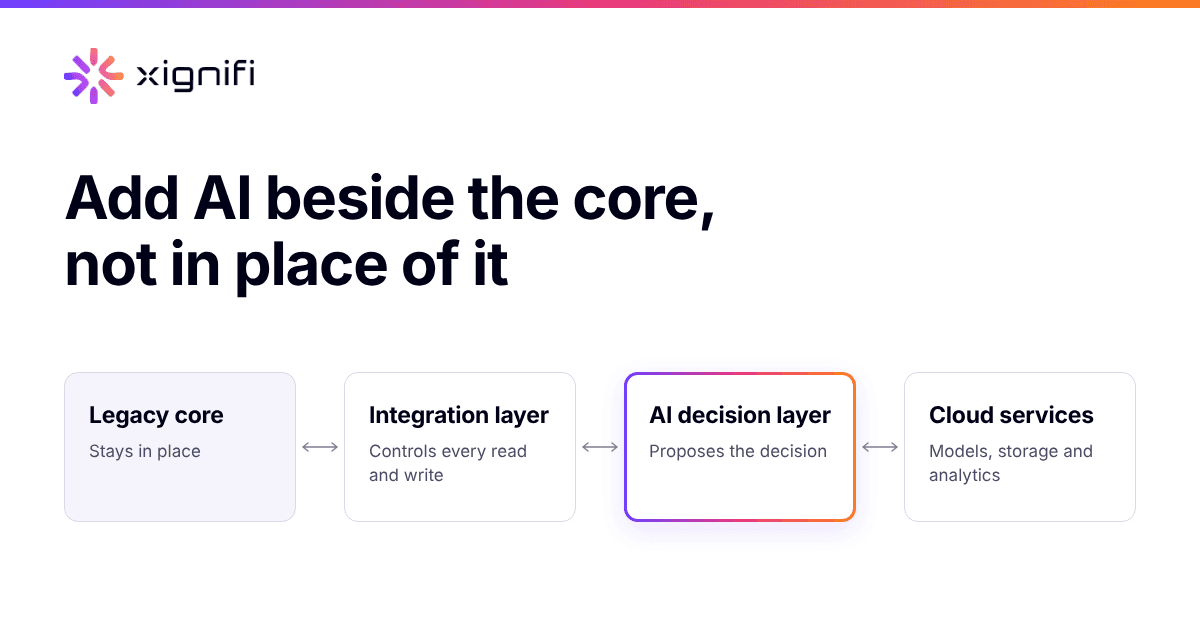
Beside the core, not inside it. The AI layer reads from the legacy system through an integration layer, proposes or makes a decision, and writes the result back through the same controlled interface. Cloud services such as storage, models and analytics sit on the far side of that layer.
Legacy System Integration Layers: Who Owns What
The table below names each layer, what it does and who usually owns it. Clear ownership makes the integration easier to govern.
| Layer | What it does | Touches the legacy core? | Usual owner |
|---|---|---|---|
| Legacy core | Holds the record and runs the existing business rules | Yes, it is the core | Application owner |
| Integration layer | Exposes reads and writes as APIs, events or data feeds, and enforces access | Yes, through approved interfaces only | IT or platform team |
| AI decision layer | Reads a case, proposes or makes a decision, and logs why | No, only through the integration layer | Process owner with IT |
| Cloud services | Hosts models, storage and analytics | No | Cloud or platform team |
| People | Review exceptions and approve actions above a set limit | No | Operations lead |
Takeaway: the AI layer never touches the core directly, so every read and write can be controlled and logged at one point.
This is the idea behind Microsoft's anti-corruption layer pattern, which places a facade or adapter between a legacy system and a newer one so the legacy system can remain unchanged.
Here is an illustrative example with hypothetical numbers. A finance team receives 2,000 invoices a week, and 300 fail the match against the purchase order held in the legacy system. The AI layer reads each failed match and proposes a reason and a correction.
If reviewers accept 240 of the 300 proposals unchanged, 240 / 300 = 80 percent need no rework, and 60 go back to a person. For the same pattern on a real document workflow, see Xignifi's guide to AI insurance submission processing software.
For the workflow side of this pattern, see the workflow automation agent.
Which Modernization Approach Fits: Wrap, Extend, Replatform or Replace?
The right approach follows the condition of the core and the pace of change, not preference. Wrap or extend a stable core. Replatform or replace when the core blocks what the business needs.
Wrap and replace are not exclusive. The strangler fig approach builds new software alongside the legacy system and moves behavior across bit by bit, and AWS's guidance on the pattern lists drawbacks such as a proxy layer that can become a single point of failure.
Legacy Modernization Approaches Compared by Situation
This table sets out common legacy system modernization approaches by situation. It reflects practitioner judgment, not a sourced framework, so check it against your own estate.
| Your situation | Approach | Why | Watch for |
|---|---|---|---|
| Stable core, interfaces exist, rules change slowly | Wrap with APIs | New capability arrives and the core is untouched | Interfaces may not expose every field you need |
| Stable core, but decisions are slow or manual | Add an AI layer | Preparation work moves off people's desks | Data freshness and batch delays |
| Core works, but hosting is the problem | Replatform | The core moves to the cloud largely as it is | The same limits move with it |
| Core blocks required change or a security need | Replace | The limit is removed at its source | Longest program and migration risk |
| System no longer serves a live process | Retire | Cost and exposure fall | Downstream dependents you have not found |
Takeaway: a sound legacy modernization strategy matches the approach to the limit you are trying to remove, and avoids replacing a core that is only slow to answer questions, such as submission review turnaround time. For worked examples, see the case studies.
How Do You Add AI Without Downtime?
Add it in stages that never put the core at risk. Start read-only, run the AI layer in shadow mode beside the people doing the work, then switch on write-back behind a feature flag with a rollback.
Add AI to Existing Systems Without Downtime: Pilot Scorecard
Test each stage on your hardest real cases, not clean demo files. The scorecard below shows what the AI may do at each stage and what must be true before moving on.
| Stage | What the AI may do | Writes to the core? | Exit check |
|---|---|---|---|
| Read-only | Reads cases, output unused | No | Reads match the source records on a sample of hard cases |
| Shadow | Proposes decisions, people decide as usual | No | Proposals match people's decisions at a rate you set from your own baseline |
| Assisted | Proposes, people approve each one | Yes, after approval | Override and rework rates sit within your baseline |
| Limited write-back | Acts alone below a set limit, behind a flag | Yes, within the limit | Rollback tested and exceptions reach a person |
| Routine cases | Handles routine cases, people handle exceptions | Yes | Audit log reviewed on a schedule |
Takeaway: set every exit check from your current turnaround time, backlog and error rate, and move on only when it holds.
Next step: compare two versions of the same AI system with the Trade-off Test, ten pairs of choices that differ in oversight, monitoring, compliance, speed and cost.
How Do You Keep Data Secure When AI Connects to a Legacy Core?
Give the AI layer its own least-privilege access, keep data where it already lives, log every read and decision, and send exceptions to people. Treat it like any other system that touches the record.
- Use a separate service identity that can reach only the fields and actions the task needs.
- Keep full records inside the legacy boundary unless your security team approves a copy.
- Log what was read, what was proposed and who approved it, so any decision can be traced.
- Set approval limits, so larger or unusual actions always go to a person.
- Review what leaves your environment whenever a cloud model is involved.
Least privilege, as the NIST glossary puts it, means each entity gets only the minimum authorizations and resources it needs to perform its function.
For a wider governance view, the NIST AI Risk Management Framework is voluntary guidance for organizations that create, build, deploy or use AI systems.
Software alone does not make a firm compliant, and your security and compliance teams decide what is acceptable. For what approval teams look for, see what CISOs look for before approving AI systems.
Where Does an Agentic Approach Fit?
An agentic approach adds an intelligence layer alongside the legacy core, working through the interfaces the existing system already exposes. AI agents can retrieve information, prepare cases, coordinate workflow steps, and recommend decisions for human approval, with each action logged for traceability.
This is where Xignifi fits. As an enterprise Decision Intelligence and agentic AI platform, it connects systems, processes information, automates workflows, and deploys AI agents to support operational decisions. On a legacy environment, agents can handle routine preparation, flag information they cannot resolve, and route exceptions to the right people. This reduces manual effort without taking critical judgment away from the teams responsible for the outcome.
The systems you can connect, and the level of automation you can introduce, depend on the interfaces and access controls your legacy core supports. These need to be assessed during the initial scoping process.
For an example of the pattern on insurance submissions, see submission triage.
Frequently Asked Questions
What is legacy system modernization?
It is the work of updating older systems so they support current business needs. That ranges from wrapping a system with APIs, through moving it to new hosting, to rebuilding or replacing it. The right choice depends on how well the system runs today and what the business needs from it next.
Can AI work with legacy systems that do not have APIs?
Yes, depending on how the legacy system exposes its data. Some systems support message queues, scheduled file exchanges or database views instead of APIs. An integration layer can use these existing interfaces to make data available to the AI layer without requiring direct changes to the core. The first step is to assess which interfaces are available and whether they support the required access controls. Xignifi's platform connects enterprise systems and supports AI-driven workflows across existing processes.
How do you prevent AI from making decisions using outdated legacy data?
Start by understanding how frequently the legacy system updates its records. A system that runs nightly batch jobs may not provide real-time information, even if the AI model responds instantly. Record the timestamp and source of every data read, define acceptable freshness limits for each workflow, and route stale or incomplete records to human reviewers. This is particularly important in workflows such as insurance submission triage, where decisions depend on accurate case information.
How do you maintain auditability when AI interacts with legacy systems?
Maintain a traceable record of what data the AI accessed, what it recommended, what action followed, and who approved or changed the outcome. Use separate service identities, role-based permissions and approval thresholds to control access and decision-making. Human reviewers should be able to inspect the evidence behind a recommendation and understand why an exception was raised. See what CISOs look for before approving AI systems for a broader view of enterprise AI governance.
Why modernize legacy systems at all?
Reasons usually fall into three groups: the system is hard to change, it is costly or risky to keep running, or it cannot connect to tools the business now needs. Name which one applies before choosing an approach. A case built on your own cost and turnaround numbers is easier to defend than one built on a general statistic.
How do you integrate legacy systems with modern platforms?
You connect through the interfaces the system already has or can be given, such as APIs, message queues, file exchanges or database views. An integration layer translates formats and controls access. Start with read-only access, then add write-back once reads are reliable.
Do you need to move to the cloud before adding AI?
No, an AI layer can read from an on-premises core through an integration layer while the core stays where it is. Moving the core is a separate decision with its own risks, so migrate when hosting is the problem, not only because AI is planned.
What should a first pilot cover?
Pick one case type with enough volume to matter, and test on your hardest cases. Run it read-only, then in shadow mode, and measure against your current turnaround time, backlog and error rate. Decide the approval limits before any write-back starts.
Editor's Note: Your Audit Will Be Decided by the Documents That Don't Go Straight Through
Modernizing a legacy core is not just about figuring out what to replace. It is about understanding what is already happening inside it, including the jobs, dependencies and business rules that may never have made it into the documentation.
Consider this: if a core runs 200 batch jobs and your inventory captures 190, you have mapped 95% of the system. That sounds reassuring until one of the remaining 10 jobs causes an unexpected issue in production. The same goes for data freshness. An AI agent cannot make a reliable decision using information that is already outdated, no matter how capable the model is.
This is why we believe modernization should start with understanding the core, not designing the AI layer. You need to know what data is available, how current it is, what processes depend on it, and where human oversight is necessary.
At Xignifi, this is central to how we approach enterprise AI. Our platform connects existing systems, processes information and deploys AI agents to prepare cases and support operational decisions, while keeping people involved where judgment and accountability matter.
The goal isn't to modernize everything at once. It's to make AI useful within the systems you can understand, govern and trust.
Check How Governed Your AI Really Is
A two-minute self-check across nine control layers, from identity and access to monitoring and auditability, that returns a Trust Score out of 45. Results are private.
Take the two-minute trust assessment