Imagine your organisation has automated thousands of documents. The process is faster, the queues are smaller, and the data is flowing into your core systems without manual re-keying.
Then an auditor asks one simple question:
“Why was this value accepted?”
Can your document automation software show the original document, the extracted value, the confidence behind it, every correction, the person who made the change, the rule or model involved, and what happened afterwards?
If the answer requires screenshots, spreadsheets, or someone piecing together events from different systems, you may have automated the process without actually controlling it.
For regulated organisations, that distinction matters. Document automation software should not just produce an answer. It should leave behind enough evidence to explain how that answer was produced and enough human control to challenge it when it is wrong.
This guide shows you what to test before buying - from audit trails and human review to data handling, exception management, version control, and operational resilience.
TL;DR: The Decision Snapshot
Regulated buyers should judge document automation software on control, not speed. Four tests matter most:
- Auditability: Can you reconstruct every material action on a document?
- Human control: Can people review, correct, and override outputs, and is that recorded?
- Data handling: Do you know where sensitive information is processed, stored, and who can see it?
- Exception handling: What happens when a document does not behave?
If a vendor cannot show all four live, on your own messy documents, treat that as a red flag. Test the exception path before you trust the happy path.
What Does Document Automation Software Automate?
Document automation software takes a document from arrival to a usable, recorded outcome. It handles intake, classification, extraction, validation, routing, approval, and hand-off to other systems. Good platforms also log each step.
This guide focuses on automation of document processing, extraction, validation and workflow. It does not cover standalone document generation.
It also helps to separate this category from its neighbours:
- Document management stores and organises files. It does not act on what is inside them.
- OCR turns images into text. It does not understand the text.
- Document generation builds new documents from templates.
- Contract lifecycle management and e-signature manage agreements and approvals.
Document automation software sits across these. It reads, checks, routes, and records.
What Happens Between Document Intake and Business Decision?
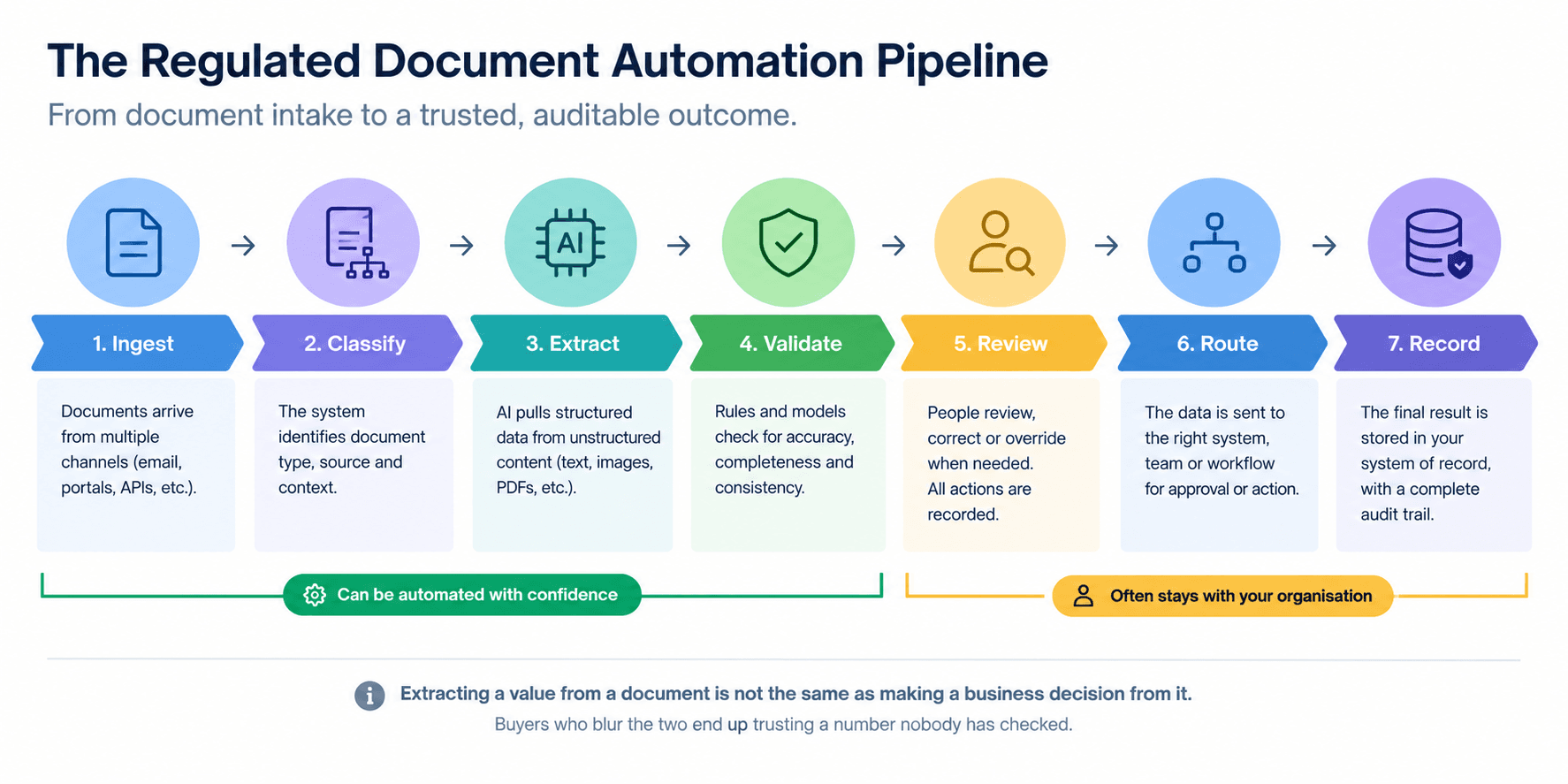
Think of one pipeline: ingest, classify, extract, validate, review, route, record.
The system can automate the first four stages with confidence. The final judgement often stays with your organisation. Extracting a value from a document is not the same as making a business decision from it. Buyers who blur the two end up trusting a number nobody has checked.
Where Does Intelligent Document Processing Fit?
Intelligent document processing (IDP) is the intelligence layer for incoming, often unstructured documents. It classifies them and pulls out structured data. Document automation software wraps that capability in the workflow around it: validation rules, routing, approvals and integrations.
If you are comparing IDP vendors specifically, read our IDP buyer guide for a deeper look at extraction capability. This guide stays on the control questions that apply to the wider platform.
Why Does Document Automation Software Need Stronger Controls in Regulated Industries?
In a regulated workflow, a wrong value is not just a typo. It can become a wrong claim payment, a missed onboarding check or a record that cannot be defended later.
Three things raise the stakes:
- Sensitive content. Documents carry personal and financial data.
- Messy inputs. Real documents arrive incomplete, inconsistent or in new layouts.
- Accountability. Someone must still explain what happened, often months later.
Buyers should assess how each platform behaves under these conditions. A polished demo rarely shows it.
Get to know more about Document-Based Frauds and Why Traditional Verification is Failing here.
Which Document Workflows Carry the Greatest Control Risk?
The highest-risk workflows are usually the ones where a document drives a financial or customer outcome. Examples include claims, underwriting, customer onboarding and KYC, policy documentation and financial statements. Insurance document automation is a common starting point because the volume is high and the formats vary widely.
What Happens When Automation Meets an Exception?
This is where platforms separate.
A strong system follows a clear path: exception, evidence, human, correction, logged outcome. The reviewer sees the source, understands why it was flagged, fixes it, and the fix is recorded.
A weak system fails quietly: exception, silent failure, downstream system, difficult investigation. The error surfaces weeks later, and nobody can trace it.
The happy path shows that automation works. The exception path shows whether it is under control.
Buyer takeaway: Ask every vendor to show you a failure, not a success.
What Should Document Automation Software Record in an Audit Trail?
Most buyer guides ask a yes-or-no question: does the platform have an audit trail? That is too shallow. A better question is what exactly the audit trail captures.
A useful document audit trail answers six questions:
- Who interacted with the document, person or system?
- What changed?
- When did it happen?
- Which version of the document, template, rule or model was involved?
- Why was an exception accepted or changed?
- What happened next, and where did the result go?
Should the Audit Trail Capture Human Corrections and Overrides?
Yes. For each correction, the record should hold the original extraction, the corrected value, the reviewer, the timestamp, the reason and the downstream action. Without this, you can see the final value but not how it got there.
Can You Reconstruct a Document's Full Journey?
This is document provenance: the ability to follow one document from the inbox to the final output. A simple test is to pick a single document and ask the vendor to show its full record, end to end.
What Makes an Audit Trail Useful Rather Than Merely Present?
Use a five-point test:
- 1.Attributable. Every action is tied to a user or system.
- 2.Chronological. Events appear in order with reliable timestamps.
- 3.Complete. Nothing material happens off the record.
- 4.Tamper-resistant. Records cannot be quietly edited.
- 5.Searchable and exportable. Your auditors can actually use it.
What Should a Complete Audit Trail Record?
| Events logged | Final output only | Key steps | Every material action, including system steps |
|---|---|---|---|
| Human corrections | Not recorded | Corrected value only | Original, correction, reviewer, reason, timestamp |
| Versioning | None | Document version | Document, template, rule and model versions |
| Integrity | Editable | Access-restricted | Tamper-resistant with retention controls |
| Access for auditors | Screenshots | Manual report | Searchable, exportable record |
Buyer takeaway: An audit trail is useful only if it can reconstruct the decision path.
Before you compare platforms, test the workflow you already have.
Not Sure What Your Audit Trail Is Missing?
We can help you build a customised audit-trail evaluation checklist based on your document workflows, review points and control requirements.
Build My Custom Evaluation ChecklistHow Should Document Automation Software Handle Human Review?
"Human in the loop" is easy to claim. It is harder to deliver. A reviewer who sees only a number and a green tick is not exercising control. That is rubber-stamping.
What Does Meaningful Human Review Look Like?
A reviewer should be able to:
- see the source document beside the extracted value
- understand the confidence level or the reason for the flag
- correct the value
- override a rule where appropriate
- escalate to someone else
- have every intervention recorded
If any of these is missing, the review is decoration.
When Should a Document Be Escalated Automatically?
Good platforms let you configure triggers. Common ones are:
- low extraction confidence
- conflicting fields
- missing data
- an unexpected document type
- a conflict with a business rule
- unusual formatting or a suspected anomaly
Ask whether thresholds are adjustable, and who can change them.
What Should Happen After a Human Corrects an Extraction?
The correction should be logged, and it should feed quality checks. Look for recurring error analysis, model monitoring and a clear way to update rules. A platform that learns nothing from corrections will ask your team to fix the same problem forever.
A higher automation rate is not automatically a better control environment. Sometimes it just means fewer people see the problem.
Buyer takeaway: Human-in-the-loop should mean human control, not human rubber-stamping.
How Should Document Automation Software Handle Sensitive Data?
"Is it secure?" is not a useful vendor question. Almost every vendor says yes. Ask where, who, how long and why.
Where Is Document Data Processed and Stored?
Ask about processing location, storage location, regional transfers, tenant isolation and whether the platform can run in a private environment. Your security and data protection teams will decide what is acceptable. Your job is to get precise answers.
Does the Vendor Use Customer Documents to Train AI Models?
Make this a mandatory question. Get the answer in writing, along with the list of subprocessors.
How Long Does the Platform Retain Original Documents and Extracted Data?
Cover retention periods, deletion, temporary files, backups, export and what happens to your data when the contract ends.
Who Can Access Documents During Human Review?
Check role-based access, privileged access and whether reviewer access is itself logged. A reviewer queue is a data exposure point if it is not controlled.
Buyer takeaway: "Secure" is not a sufficient answer. Ask where, who, how long and why.
How Should You Evaluate Document Automation Software Before Buying?
Use a simple seven-test framework. Score each platform against it using your own documents, not the vendor's samples.
- 1.Traceability. Can the vendor reconstruct what happened to one document?
- 2.Human control. Can people intervene in a meaningful way?
- 3.Data control. Can you explain where information goes?
- 4.Exception handling. What happens when automation fails?
- 5.Version control. Can you identify which template, rule or model produced an output?
- 6.Integration. Does it connect cleanly to your CRM, ERP, document management, claims and policy systems?
- 7.Operational resilience. What happens if the model changes, the vendor changes, an API fails or volume spikes?
The last test is often skipped. Enterprise document automation sits inside critical processes, so you need to know how the process runs if the service does not.
Document Automation Software: 7-Test Buyer Scorecard
| Test | What to check | 0 — Missing | 1 — Basic | 2 — Strong | 3 — Enterprise-ready |
|---|---|---|---|---|---|
| 1. Traceability | Can you reconstruct one document’s complete journey? | Final output only | Key events | Most actions | Full end-to-end record |
| 2. Human control | Can reviewers inspect, correct, override and escalate? | No intervention | Manual correction | Review + correction | Configurable review, override and escalation with full logging |
| 3. Data control | Can you explain where sensitive data is processed, stored and accessed? | Unclear | Basic security information | Clear controls | Processing, storage, access, retention and subprocessor controls are demonstrable |
| 4. Exception handling | What happens when extraction or validation fails? | Silent failure | Manual intervention | Defined exception queue | Configurable rules, evidence, escalation and recorded resolution |
| 5. Version control | Can you identify which document, template, rule or model produced the result? | No version history | Document version only | Document + rule/template | Document, template, rule and model versions |
| 6. Integration | Can it reliably connect with your systems of record? | Manual export | Basic connectors | APIs/integrations | APIs, events, monitoring and failure handling |
| 7. Operational resilience | What happens when models, APIs, vendors or volumes change? | No clear process | Manual recovery | Defined fallback | Monitored resilience, recovery and continuity mechanisms |
One practical rule: test the messiest document first. The easiest document to automate is often the least useful one to test. Include poor scans, handwriting, missing fields, contradictory data and multi-document packs.
At Xignifi, the same logic shapes how we design decision workflows: every step observable, with approval gates where judgement matters.
Buyer takeaway: Test the exception path before trusting the happy path.
What Questions Should You Ask a Document Automation Software Vendor?
Generic checklists get generic answers. Ask for demonstrations. Here are the questions that tend to expose gaps.
What Should You Ask About Auditability?
- Show me the audit record for one document, from ingestion to final output.
- Are corrections recorded, including the original extraction?
- Can I identify the user or system behind each action?
- Can audit data be exported?
What Should You Ask About AI and Human Review?
- Show me what happens when extraction confidence is low.
- What triggers a review, and can we configure it?
- Is the source shown beside the result?
- Show me what happens if the AI produces the wrong value.
What Should You Ask About Data?
- Where is our data processed and stored?
- Is it used for model training?
- Who are the subprocessors?
- What happens after deletion?
What Should You Ask About Integration and Change?
- Show me who can change a template, and whether that change is recorded.
- Which APIs and webhooks are available?
- How do you monitor failed integrations?
Shortlisted a Document Automation Vendor? Test It Before You Commit.
Bring your vendor shortlist and a real document workflow. We’ll help you assess the capabilities that matter beyond extraction accuracy.
Book Your Evaluation CallWhen Is Document Automation Software the Wrong Choice?
Sometimes automation is not the answer yet. Hold off when:
- document volumes are too low to justify the effort
- the process changes constantly
- source data is unreliable
- decision logic is undefined
- nobody owns the process
- exceptions make up most of the volume
- the controls you need cannot be put in place
A platform can extract a value correctly and still create a weak process if nobody can explain what happened next. Fix the process first, then automate it.
How Does Document Automation Software Fit into an Enterprise Architecture?
Document automation software usually sits between source channels and your systems of record. It does not need to replace them.
Should Document Automation Replace Your Document Management System?
Usually not. Your document management system stores. Your CRM and ERP hold the records. Your workflow engine coordinates tasks. Document automation reads, validates and routes. Each has its own job.
How Should It Connect to Systems of Record?
The clean pattern is: source systems, document automation, validation, workflow, system of record. Look for open APIs, event-driven hand-offs and monitoring for failed transfers.
What Does Good Document Automation Software Look Like in an Insurance Workflow?
A carrier receives first notice of loss documents, emails, photographs and supporting records. Each arrives in a different format.
Before: manual intake, re-keying, queues, then review.
After: ingestion, classification, extraction, validation, exception review, then the claims system.
The control layer is what makes the second version defensible. Every meaningful intervention is recorded. A reviewer who corrects a claim value leaves the original, the correction and the reason in the audit trail. Months later, a compliance team can follow that single claim from inbox to payment.
That is what insurance document automation should deliver: less re-keying and a record that stands up to questions.
How Should Document Automation Software Change as AI Becomes More Autonomous?
Automation has moved through stages:
- 1.Rules-based templates
- 2.AI-assisted extraction
- 3.Context-aware document processing
- 4.Agentic workflow orchestration
- 5.Higher autonomy with stronger governance
As systems move from reading documents to interpreting, routing and acting on them, auditability becomes more important, not less. The more a system does on its own, the more you need to prove about what it did.
What Should You Measure After Implementing Document Automation Software?
Track both speed and control:
- processing time and straight-through processing rate
- exception rate and human review rate
- extraction accuracy and correction rate
- rework and throughput
- cost per document and SLA adherence
- audit exceptions, failed integrations and data incidents
Set a baseline before go-live. Review it at 30, 60 and 90 days.
What Are the Most Important Document Automation Software Questions for Regulated Buyers?
What should regulated organisations check in document automation software before they buy?
Check five controls before you shortlist any document automation software: the audit trail, human review, data handling, exception management and version control. Then confirm it connects to your systems of record. Ask each vendor to demonstrate all of them on your own documents, including poor scans. If a control exists only in a slide deck, you cannot show it to an auditor.
Does document automation software provide an audit trail that will stand up to an audit?
Many platforms log something, but few log enough. A defensible document audit trail records the source document, the extracted value, every human correction and its reason, the reviewer, timestamps, and the document, template, rule and model versions used. Ask the vendor to show the full record for one document, from ingestion to final output. If they cannot reconstruct it, you cannot defend it.
Does document automation software need human review, and what makes that review meaningful?
For high-risk or low-confidence documents, yes. Review is meaningful when the reviewer sees the source beside the extracted value, knows why it was flagged, can correct or override it, and the action is recorded. A reviewer who only clicks approve on a confidence score is rubber-stamping, not exercising control. Check that review thresholds are configurable.
Is document automation software safe for sensitive customer documents?
Safety depends on specifics, not claims. Ask where documents are processed and stored, whether your data trains AI models, which sub processors can access it, how long originals and extracted data are kept, and who can view documents during human review. Get the answers in writing, and involve your security and data protection teams before the pilot. See more on what CISOs look for before approving AI systems.
What is the difference between document automation software and intelligent document processing?
Intelligent document processing (IDP) reads, classifies and extracts data from documents. Document automation software covers the wider workflow around that data: validation, routing, approvals, system integration and audit logging. IDP is usually one layer inside it. So judge vendors on the controls around extraction, not extraction accuracy alone.
What should insurers look for in insurance document automation software?
Look for proof on your real claims and underwriting files, not clean samples. Test variable formats, missing fields, exception routing, integration with claims and policy systems, and whether every reviewer correction is logged with its reason. Insurance document automation earns its place when the exception path is as strong as the happy path.
How do you test document automation software before deployment?
Run a pilot on your messiest documents: poor scans, handwriting, missing fields, conflicting data and multi-document packs. Set pass criteria first: accuracy, exception rate, review time and whether each correction is logged. Ask the vendor to show a wrong value being caught, reviewed, corrected and recorded. A pilot that avoids failures proves nothing.
What is the biggest mistake when buying document automation software?
Buying against the demo instead of the exception path. A clean demo shows that automation works. An exception shows whether it is controlled. Before you shortlist, insist on watching the platform handle a wrong value from detection to logged correction, then take that evidence to your risk and audit teams.
Editor's Note: Your Audit Will Be Decided by the Documents That Don’t Go Straight Through
We stopped judging document workflows by their automation rate a long time ago. Automation rate tells you how the easy documents behave. Nobody gets asked about the easy documents.
Here is the arithmetic that changed how we build. We processed more than one million policy documents for a premium finance giant. At that volume, an exception rate of just 1% is 10,000 documents that a person must review, correct and later be able to explain. Rare stops being rare. If those 10,000 corrections are not recorded with the original value, the new value, the reviewer and the reason, you cannot reconstruct a single one of them when someone asks.
The second thing we learned came from automating contract intelligence across 18 contract types for an insurance distribution platform. Eighteen document types do not fail in the same way. Each has its own layout, its own clauses and its own ways of being incomplete. A single review threshold applied to all of them is wrong for most of them. We set review rules per document type, and we watch where reviewers keep making the same correction. That pattern is almost never a reviewer problem. It is a rule, a template or a model that needs fixing once.
This is why we tell buyers to ask for the correction log before they ask for the accuracy figure. Accuracy tells you how often the system was right. The correction log tells you what happened when it was wrong, and whether anyone can prove it.
Our position is simple. We would launch a workflow at a lower straight-through rate with every exception on the record before we would launch one at a higher rate with gaps. The first can be improved. The second has to be defended.
That is how Xignifi designs every document workflow: each step observable, with human approval wherever judgement matters.
Put your hardest document workflow on trial, not your easiest demo.
Bring one real workflow, including the awkward documents and the exceptions. Through a Xignifi Document Automation Assessment, you will see where automation can safely remove manual work, where human review should stay, and which controls need to exist before production.
Assess Your Document Automation Workflow
See where Xignifi can reduce manual work, manage exceptions and maintain the controls needed for production.
Book Your Assessment